|
Google Chrome and Java
Java 8
Installation/Setup
Test Customization
Admin Settings and Queries
|
Test Settings and Results
Errors/Troubleshooting
Access Cloud Servers
Glossary
|
|
|
Since upgrading to Java 8 all tests fail. Why?
Anyone running MyConnection Server 9.7i or below will find that every test fails under the new Java 8 update.
To solve the issue simply upgrade to v9.7j or above. Click here to download.
NOTE: If tests have been published to third party web servers then FURTHER CHANGES WILL BE NEEDED in relation to the applet code. These changes are explained here. |
|
|
How do I access the MCS Administration Interface (MCS main menu)?
The MCS Main Menu can be accessed at the URL https://mcs_address/myspeed/admin, where 'mcs_address' is the domain or IP of your MCS server.
If there is no MCS custom test page redirection enabled from the MCS root directory, the MCS Main Menu can then be accessed at https://mcs_address, where 'mcs_address' is the domain or IP of your MCS server. |
|
|
How do I move my installation without losing any settings or data?
For help moving an installation see the links below. These details upgrading but the process is the same as moving, even if the version isn't changing.
Windows
Mac OS X
Linux/Unix
|
|
|
How do I stop Microsoft/IIS from grabbing all available ports?
A problem with IIS often causes it to grab
port 80 on all IP addresses, not just the ones assigned
to web sites. For information on how to resolve this,
see Microsoft support, info
for IISv6, info
for IISv5.
Info for IISv7:
If any of the sites listed in IIS7 Manager have a binding of *:80, :80 or [host header] on :80 then IIS will grab every single port 80 regardless of whether the site is running or not. IIS7 has a 'listen list' (more information).
The solution, according to this page, is to run the following command from the command prompt:
netsh http add iplisten ipaddress=x.x.x.x:80
...which will add the x.x.x.x address (and only the x.x.x.x address) to the listen list. IIS will not listen on any other address.
The IIS and WWW services need to be restarted for the changes to take effect. |
|
|
How do I use MCS on IIS or Apache?
MCS has a built-in web server
that can be used to serve the applet and your associated
web pages. You can also use a third party web server
such as IIS or Apache by utilizing the codebase parameter
within the applet HTML tags to specify the location
of the MCS Server. In the example below, the codebase
calls the applet from 'www.visualware.com'.
Please note that the domain used to serve the applet
has to be allowed under Server Configuration, Permitted
Domains.
<applet MAYSCRIPT code="myspeedserver/applet/myspeed.class" archive="/myspeed/myspeed.jar,/myspeed/plugins.jar" width=600 height=400 codebase="https://www.visualware.com"> |
|
|
Is there a recommended web server?
Apache: Servers running the latest
version of the Apache
HTTP server produce better results for upload when
the network connection speed 10Mbit or greater. This
is because Apache provides larger buffers than IIS,
which is currently limited to 8K. MySpeed limits the
upload buffer on Apache to 128K. The server itself
should have network/Internet connectivity sufficient
to handle multiple concurrent MySpeed tests (100 Mbps
server connectivity is common today). To try MyConnection Server
on your web server, download
a trial copy.
Virtual Servers: MCS is supported on virtual servers. |
|
|
Will MCS work on my LAN/WAN/Cable/DSL Network?
MyConnection Server will work on any network. The MySpeed network test is optimized to provide accurate download results up to about 100 Mbps and accurate upload results up to about 10 Mbps when an Apache web server is used. Other web servers can be used, but the accuracy of the upload numbers will be reduced slightly. |
|
|
Will MCS work through my proxy/web cache?
It should, as we have tested in various proxy and web cache environments. However, in these environments, MySpeed may run with reduced upload accuracy. If you notice any issues, please contact us with details, as there are known workarounds. |
|
|
Will MCS work through my corporate firewall?
It should. However, some aggressive firewall techniques may interfere with some network tests. If this happens in your firewall environment, please contact us for known workarounds. |
|
|
How many concurrent sessions can a single server handle?
If you are running MyConnection Server on a server meeting the minimum
requirements,
the number of concurrent tests that can be run is mainly
dependent on the available bandwidth. For instance, if you
are running a MyConnection Server on 100Mb connection and a remote
user with a 100Mb connection performs a connection speed test, all of
the bandwidth will be consumed for the duration of the test
(the
is 8 seconds). Conversely, if most
of your end-users have 5Mb Internet connections, approximately
20 tests could be run concurrently.
MyConnection Server includes a throttle option that can
be set to smooth out usage and delay new connection tests
until current tests have completed. This option is transparent
to the end user, the throttling option can be set in
'Administration, Server Configuration'. |
|
|
What are the sample download/upload file sizes?
Download: The default file used for the download
speed test is a fully compressed 10Mb file. The file
may be changed to any file in the 'Applet Configuration,
Operations' options.
However, if changed the replacement file should also
be fully compressed, otherwise the speed test results
may be inaccurate as compressions will reduce the amount
of data transmitted for the test.
Upload: Multiple upload sizes, ranging in size
from 8 KB to 128 KB (size depends upon the web server
used and your Internet connection speed), but with
an 8 second timeout.
Timeout: The timeout
value of 8000 milliseconds (8 seconds) can be modified
via the timeout setting in the 'Administration,
Applet Options, Operations' option. |
|
|
What is the Quality of Service percentage?
It is the ratio of the slowest download
rate to the highest download rate, as seen during a
single MySpeed download test. Full
Details |
|
|
What is 'Upload Burst'?
If MySpeed detects that your cable modem system supports an 'upload burst', that upload burst number will be displayed. Some cable modem systems allow small data transfers (like 8K or less) to operate faster than the rated speed of your cable connection, and only cap the data transfer to the rated speed after a very short period of time (300ms or so) of constant use of the data channel. Please note that this burst mode is usually only available to you when there is extra (unused) capacity in the cable system. |
|
|
What ports do I need to open on my sever?
|
The default ports for the various MyConnection Server test types are listed below. The ports can be changed if needed in the MCS server configuration page.
MySpeed: TCP, ports 20000, 20001
MyHiSpeed: same as MySpeed above (the HiSpeed module requires use of the MySpeed module)
MyVoIP: UDP, ports 20000, 20001, TCP port 5060 (SIP test)
MyCapacity: UDP, port 8090
MyVideo: TCP, port 554
MyIPTV: UDP, ports 554, 555, 556
MyRoute: ICMP outbound - echo request; ICMP inbound - TTL expired in transit, Echo reply
MyFirewall: UDP/TCP, these ports (or port ranges) are set in the 'custom test' option
The following ports should be opened to enable DNS lookups, reporting of host names, ISP information and country locations.
Port 43 - Whois Lookups
Port 53 - DNS Services
MyConnection Server includes a web engine which normally runs on HTTP port 80, although it can run on other ports. If MCS is to coexist on a server with IIS and you want MCS to run on port 80, see:
stop IIS port grab.
|
|
|
What results can be expected with MySpeed?
MCS MySpeed includes socket testing in
addition to HTTP testing. The socket-to-socket download
and upload speed tests provide the most accurate speed
tests available. The standard HTTP speed test will
be used as a backup, in case a client's firewall prevents
direct socket connections to the MySpeed Server ports.
You can also setup the download and upload independently,
with one using socket and the other using HTTP.
| RATED NETWORK
SPEED |
EXPECTED
SOCKET RESULTS |
| Network |
download |
upload |
download |
upload |
| LAN |
10
Mbps |
10
Mbps |
9.49
Mbps |
9.49
kbps |
| LAN |
100
Mbps |
100
Mbps |
94.9
Mbps |
94.5
Mbps |
HTTP Speed Tests: MySpeed measures actual HTTP
data transfer performance -- not rated network speeds.
Since there will always be some overhead associated
with a network connection, you can expect results on
high quality networks (and reasonably fast computers)
to approach around 95% of the rated download speed
and around 92% of the rated upload speed, similar to
the following:
| RATED NETWORK
SPEED |
EXPECTED
HTTP RESULTS |
| Network |
download |
upload |
download |
upload |
| T1 |
1.544
Mbps |
1.544
Mbps |
1.46
Mbps |
1.44
Mbps |
| Cable Modem |
3.0
Mbps |
256
kbps |
2.88
Mbps |
241
kbps |
| LAN |
10
Mbps |
10
Mbps |
9.49
Mbps |
9.15
Mbps |
When MySpeed was tested in a local 100 Mbps LAN environment,
with a client connected to the server via a 10/100
Mbps switch with various speed and duplex settings,
the following 'download/upload' results were observed
(all numbers are in Mbps):
| 10 Mbps Full |
10 Mbps Half |
100 Mbps Full |
100 Mbps Half |
| 9.49/9.17 |
8.08/7.77 |
85.4/69.0 |
70.4/65.1 |
| 9.49/9.17 |
8.12/7.98 |
82.1/70.4 |
71.4/65.1 |
| 9.49/9.10 |
8.12/7.65 |
82.6/69.0 |
71.7/66.3 |
| 9.49/9.17 |
8.05/7.70 |
85.9/69.0 |
71.2/66.3 |
| 9.49/9.12 |
8.11/7.77 |
84.9/71.8 |
72.6/62.7 |
Please note: (1) The CPU speed of the server
and/or client used can dramatically affect the results.
(2) The upload results for 100 Mbps are displayed for
reference only - even though we only rate MySpeed HTTP
upload accuracy to 10 Mbps. |
|
|
Why are time stamps shown in the table incorrect?
The time stamps in the table are all supposed to be local, however there is a known issue in Java itself which can cause the wrong timestamp to be shown.
There's information on this bug here: https://www.petefreitag.com/item/171.cfm
An official bug report was filed with Sun Microsystems (the makers of Java), though it was closed as 'not reproducible' despite evidence to the contrary: https://bugs.sun.com/bugdatabase/view_bug.do?bug_id=6362432
We would suggest the following:
(1) Please try updating your Java VM. Most customers have found that this solves the problem completely.
(2) If this fails, try switching off the "adjust clock for daylight savings time" option. We have found that this solves the problem under older Java VMs.
If the issue still presents itself then please contact us. |
|
|
Why do I get different results at different times?
Under ideal network conditions, MCS MySpeed will provide
virtually identical results every time that it is run
(verified in lab conditions). And that accuracy is
only possible because MySpeed times data transfers
down the millisecond (1/1000 second), while most other
speed testers can only time data transfers accurate
to 1/100 of a second (10's of milliseconds). So MCS MySpeed
is very precise.
However, in most environments, you will find that you
are sharing the network, your Internet connection,
and the server you are connecting to, with other Internet
users. So unless you are the only person using the
network and the server, you can and should expect a
little variation in the results.
If you see wildly different results each time MCS MySpeed
is run, that strongly suggests that you are sharing
your network and/or server with too many other Internet
users. |
|
|
Why is a direct socket-to-socket connection test more accurate than an HTTP test?
The difference in results is due to the different layers of the OSI model. A direct socket-to-socket connection works at the lower TCP transport layer. A HTTP connection uses a browser which works at the application layer and is subject to factors such as browser caches and proxies which can affect results, particularly on high speed networks (see the following FAQ). Socket-to-socket testing is available in MCS MySpeed Edition and the MySpeed PC Standard and Advanced Editions. |
|
|
Can I customize the MCS display?
Yes, go to Administration, Applet Configuration
to view and modify settings. Some items that can be
customized are below:
Strings: to localize to another language
or adhere to company conventions
Labels: add/remove labels on the graph
Scale: change the 10 kbps to 1 Gbps range
Color: change the red/yellow/green to
bps color mapping
Extras: enable/disable extras: upload
burst, QOS, RTT, max pause
|
|
|
Can the MCS parameters be set in the applet web page?
Yes. MCS parameter values can be overridden
by setting a HTML applet parameter in the web page serving the applet. This technique can be used
to create custom behaviors on a page by page basis.
For example the HTML below can be inserted within
the <applet></applet> tags to
set the speed test to Automatic Start mode.
<param name="start" value="*">
It is also possible to create multiple applet configuration
files with different parameter settings and set up
multiple web pages to serve the applet using different
configuration files. This can be set in the Administration,
Applet Configuration option, or in the web page HTML.
For example, the code below would use a user-created myconfig file
for the web page:
<param name="config" value="myconfig"> |
|
|
How can I display a MCS test page for my users instead of the MCS main menu?
|
|
How do I turn off links to the detailed analysis?
The links to the 'detailed analysis' that appear in the applet Summary tab and the Web detail report can easily be turned off through the process below.
To disable the links you must first create a custom test and publish the custom test to a web page.
To disable the links to the detailed analysis, use the steps below:
1. From the MCS Main Menu, go to 'View Published Pages'
2. For the page that you want to modify, click the corresponding link in the 'Configuration' column
3. On the 'Applet Configuration' page, click 'Show global applet' options
4. Click 'Operation and display options' to expand the section
5. Scroll down to the 'Detail Report Link Display', uncheck the box for 'Allow links to detailed analysis' and Save
The Applet Configuration options can be used to customize many display and behavior options of the MCS applet, such as the text displayed, show/hide metrics, show/hide tabs, enable Session ID (automated tagging of results), turn animation on/off, automatically start test on page load, etc.
|
|
|
Is MCS available in languages other than English?
MCS is not currently sold in other languages, however you can easily translate the display text of the server applet to another language. To do so, go to 'Administration, Applet Configuration, Messaging' and edit the text labels as desired. |
|
|
Why can't I copy the 'i' audit report anymore?
Oracle, the developer of the Java programming language, released Java 6 Release 24 (Java 1.6.0_24) in February 2011 to remedy 21 vulnerabilities: Announcement
As part of this security release, it appears that the ability to copy & paste from a computer's clipboard into a Java environment has been deemed a security threat, and therefore disabled. MyConnection Server is not preventing the copy/paste function -- the Java program on your computer is preventing it.
Solution:
In order to allow access to the clipboard, add to your java.policy file the following line and retry:-
permission java.awt.AWTPermission "accessClipboard";
The java.policy file can be found in the java install directory, normally:
C:\Program Files\Java\jre6\lib\security\
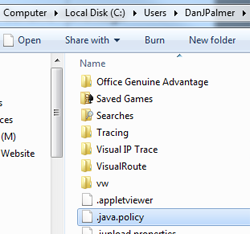
Copy the file to User Home folder:
C:\Users\--your--user--name--\ (Win7/8/10)
AS ".java.policy" Please note the period (.) at the front of the file name. Example shown to the right.
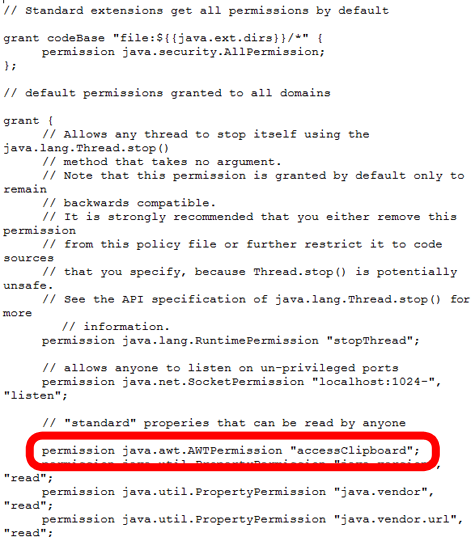
Add this line
permission java.awt.AWTPermission "accessClipboard";
to the file just after the following line:
// "standard" properties that can be read by anyone
The file should now look like this:
SAVE file and reload browser
Copy and paste to the clipboard will now work for the MyConnection server applets. |
|
|
Why can't I set up an alternate server to post test results to from a remote agent? I've chosen a server but they aren't showing.
The most common problem in this situation is an incorrect server specification. When entering a host name or IP address for an alternate MyConnection Server to post results to it's important to leave the https:// preffix off. For example entering https://mcs.visualware.com would fail, whereas just mcs.visualware.com would succeed.
If you are still experiencing problems please contact us |
|
|
Why do I get a 'Please check that your computer can run' message when trying to run a Remote Agent (RA)?
The problem you have encountered is a Java problem caused by version 1.7_21.
There are two ways to solve this:
1) Upgrade MyConnection Server to 9.5c, this should resolve the issue. The download links are available at here. Recommended
2) If upgrading is not a viable option it's possible to replace the existing 'rta' file with a newer version. Download the rta.zip file and unzip it into the /data folder of the MyConnection Server installation directory. Make sure the MyConnection Server service is shut down when doing this. |
|
|
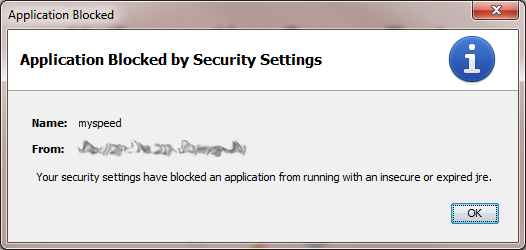
Why do I see a 'Application blocked by security settings' message when trying to run a test?
|
|
Why do I see a 'not licensed' message on the applet even though the license key is applied?
If a 'NOT LICENSED for…' message appears on the MCS applet, it is due to the applet being served from an unauthorized domain or IP address. As a security measure, the MCS applet can only be served from a domain or IP that you authorize. To enable authorization, from the MCS Main Menu, go to Administration > Server Configuration, scroll down to the Permitted Domains and add the domain or IP address that you want to allow. |
|
|
The auto update feature isn't working for my Access Cloud Series device?
|
|
What is Jitter?
Jitter is a key measure
of VoIP quality. Jitter refers to is the
variation in time between packets sent and packets
arriving caused by network difficulties such
as route changes, congestion, packet loss, traffic
regulators etc. VoIP works by sending
voice data as a stream of packets from source
to destination. These packets can take a varying
amount of time to reach the destination and invariably
do not arrive in the order in which they were
sent.
For a VoIP telephone call to work well the packets
sent from the source must arrive within a certain
time window (or 'buffer') in order
for the receiving end to reassemble the packets
in the correct order and reproduce the spoken
words. When there is excessive jitter the time
delay is too long (high latency) and packets
arrive outside the time window and get lost from
the call (discarded). As a result, the recomposed
sound no longer reflects exactly what was sent,
and depending of the extent of the delay may
not be understandable by the recipient. MyVoIP measures the level of
jitter on a connection and reports the associated level
of VoIP sound quality. |
|
|
What is the Mean Opinion Score (MOS)?
The MOS, or Mean
Opinion Score, is a numeric measure
used for VoIP, indicating the sound quality at the receiving end of
a communication circuit. Although the score
is subjective it provides a widely-used method
to rate the quality of voice communication
in a simple way that meaningful to end users.
The score is normally between 1 and 5 with
5 being the best.
MyVoIP tests the line quality and measures the highest MOS that a connection can achieve - this is independent of the Codec selected for the VoIP test. The MOS value is reported in the MyVoIP summary tab once a connection test completes,
a VoIP simulation that drops below 3.5 is considered
poor quality, a measure of 4.2-4.5 is considered
good quality.
| MOS |
Quality |
Impairment |
| 5 |
Excellent |
Imperceptible |
| 4 |
Good |
Perceptible but not annoying |
| 3 |
Fair |
Slightly annoying |
| 2 |
Poor |
Annoying |
| 1 |
Bad |
Very annoying |
|
|
|
What is Packet Loss?
Packet loss plays a key role in the quality of VoIP connections, as high packet loss causes some of the voice data not to arrive to the recipient. Packet loss occurs when voice packets are discarded by the jitter buffer (see previous FAQ), or dropped by network routers/switches due to high congestion. MyVoIP measures the percentage of packet loss and reports the associated level of sound quality. |
|
|
How can I ensure that the number of concurrent speed tests does not degrade the MCS service?
MyConnection Server provides a throttling option which allows you to define how many tests a remote user can perform over a period of time. The period of time can be anything you require such as a number of minutes, a number of hours or even a number of days. This option can be set in 'Administration, Server Configuration'. |
|
|
How can I restrict a single user from continually running MCS tests?
MyConnection Server provides a throttling option which allows you to define how many tests a remote user can perform over a period of time. The period of time can be anything you require such as a number of minutes, a number of hours or even a number of days. This option can be set in 'Administration, Server Configuration'. |
|
|
How do I reset the Access Control List (ACL)?
The Access Control List can be reset using the intructions below. If you're having problems accessing MyConnetion Server and have recently made changes to the Access Control List then follow this FAQ.
To reset the Access Control List:
• Stop the MCS server
• Rename the acl.txt (to anything other than acl.txt) file in the MCS root directory
• Restart the MCS server
|
|
|
Where can I find a full list of variables for use with SQL and JavaScript reporting?
A full list of variables can be found here.
These variables are the same for both SQL and Javascript reporting. |
|
|
Why does the MCS Windows service stop when I log off a remote connection to the server?
This problem sometimes occurs when you log out of Terminal Services. This seems to be caused when the logon tab specifies the System service, and is resolved by setting the service to run as the Administrator user.
To change the user in Windows 2003:
1. Stop the service
2. In the service Log On tab, check This Account
3. Enter Administrator as the user name
4. Enter the password and re-confirm it in the relevant boxes
5. Click OK
6. Start the service |
|